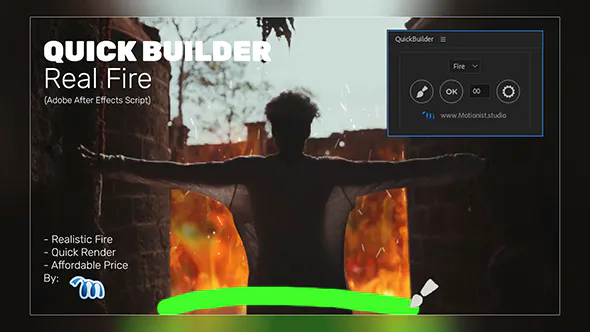
Real fire is hard to shoot safely and hard to fake well. Stock flames rarely match your camera angle, and particle setups can take hours to tune and render. This post walks through adding a fire effect in After Effects to a live-action shot, using our Real Fire Quick Builder script as the example, and covers the compositing steps that make any digital fire sit convincingly in a scene.
The project below is an illustration of a typical workflow, not a client case study. The compositing tips apply whichever fire source you use.
The example project: a burning sign for a music video
Imagine a music video with a night exterior: a wooden sign by a road, shot on a tripod. The director wants the sign to catch fire during the last chorus. Real flames aren’t allowed on location, so the fire has to be added in post. The shot needs three things:
- Flames that follow the shape of the sign, not a rectangle of stock footage.
- Light from the fire on the sign, the ground and the performer.
- Atmosphere: heat haze, glow and a little smoke.
What Real Fire Quick Builder does
Real Fire is part of Quick Builder, an After Effects script for creating realistic visual effects with fast rendering. According to the product page, Real Fire is the effect available in this version. You can paint fire with a brush and adjust it with a range of options. It works on videos or still images of any size, and it doesn’t need any third-party plugins.
The brush is the important part for this shot. Instead of fitting a pre-rendered flame clip to the sign, you paint where the fire should be, so it follows the sign’s edges.
Fire effect in After Effects: step by step
Step 1: Prepare the plate
Import the shot and create a composition from it. If the camera moves, track it first so the fire stays attached to the sign. Our guide on how to track motion in After Effects covers point, planar and 3D camera tracking. For a locked-off tripod shot like this one, you can skip tracking.
It also helps to darken the plate slightly before adding fire. Night shots often look brighter on set than they will after grading, and fire reads better against a darker background.
Step 2: Paint the fire
Run the script and use the brush to paint fire along the top and edges of the sign. Flames rise from the burning surface, so paint along the edges where the fire starts and let the flames reach upward from there. Don’t cover the whole sign evenly. Real fire has hot spots and gaps.
Step 3: Build up over time
A sign doesn’t burst into flames at once. A simple way to show the fire spreading is to reveal the fire layer with an animated mask: start with a small mask at one corner and expand it over a few seconds, with a wide feather so the edge isn’t visible. Time the moment the sign is fully alight to a beat in the music, so the effect lands with the edit.
Step 4: Blend the fire into the plate
Fire is light, so it should add brightness to the scene rather than cover it. If your fire layer has a dark background, a blending mode such as Add or Screen drops the dark areas and keeps the bright flames. If it has transparency, Normal mode works, but a slight Add-mode copy on top often makes the core look hotter.
Make the fire believable: compositing tips
These steps matter more than the flames themselves. They work with any fire source in After Effects.
Light the scene
Fire lights everything near it. Duplicate the plate, warm it up with a colour correction such as Curves or Tint, and mask it to the area around the flames with a large feather. Then add a gentle flicker to its opacity, so the light moves with the fire. A wiggle expression on Opacity is the quickest way:
wiggle(8, 15)This varies opacity eight times a second by up to 15 percent. Adjust the numbers to match how fast the flames move. Our wiggle expression guide explains the two values in detail.
Add glow
Bright flames bloom in a real camera. Add a Glow effect to the fire layer, or a blurred Add-mode copy of it, to soften the edges. Keep it subtle. Too much glow makes fire look like a neon sign.
Add heat haze
Hot air bends the light behind it. Create an adjustment layer above the plate, mask it to the area just above the flames, and apply Turbulent Displace with a small amount. Animate its Evolution property so the distortion keeps moving. This step does a lot to sell the shot, even though viewers rarely notice it consciously.
Match the grade
Fire from any source is clean. Your footage has grain, softness and a colour grade. Add a little grain to the fire layer if the plate is noisy, and make sure the brightest part of the flames isn’t brighter than the brightest highlight the camera could have captured. Then grade the whole comp together, not the fire on its own.
Rendering and delivery
The product page notes that Quick Builder is designed for fast rendering, which helps when you need to try a few versions for a director. If you want to hand the fire over as a separate element for an editor or colourist, render it with transparency. Our guide on exporting transparent video from After Effects walks through the formats that keep the alpha channel. For a faster preview while you work, see our tips on making After Effects faster.
Other ways to finish the shot
Once the fire is in, a few small touches make the shot feel finished. A slow push-in or a little camera shake as the sign ignites adds energy. You can record that movement with your phone using our Phone Camera Controller for After Effects, which gives a natural handheld feel. For titles in the same video, the 2000+ Animation Presets pack covers text moves in After Effects and Premiere Pro.
FAQ
Do I need a plugin to make fire in After Effects?
No. You can build fire with built-in effects such as Fractal Noise and Turbulent Displace, or use stock footage. Real Fire Quick Builder is a script, and its product page says no plugin is needed.
Does Real Fire work on still images?
Yes. The product page says it can be used on videos or still images of any size.
Which blending mode should I use for fire?
Add or Screen usually work best when the fire is on a dark background. They keep the bright flames and drop the dark areas.
How do I make fire light up the scene?
Duplicate the plate, warm it with a colour correction, mask it around the fire with a soft feather, and add a flicker to its opacity with a wiggle expression.
Studio list
Get new tools and free drops first
One email when a new plugin, template or free pack is out. No spam, unsubscribe any time.

